This is an easy trick to reset your password without having to go through the email reset process which can be a bit shaky at times. Here’s how I do it via phpMyAdmin.
1. Select and edit the user row in question from the *_users table
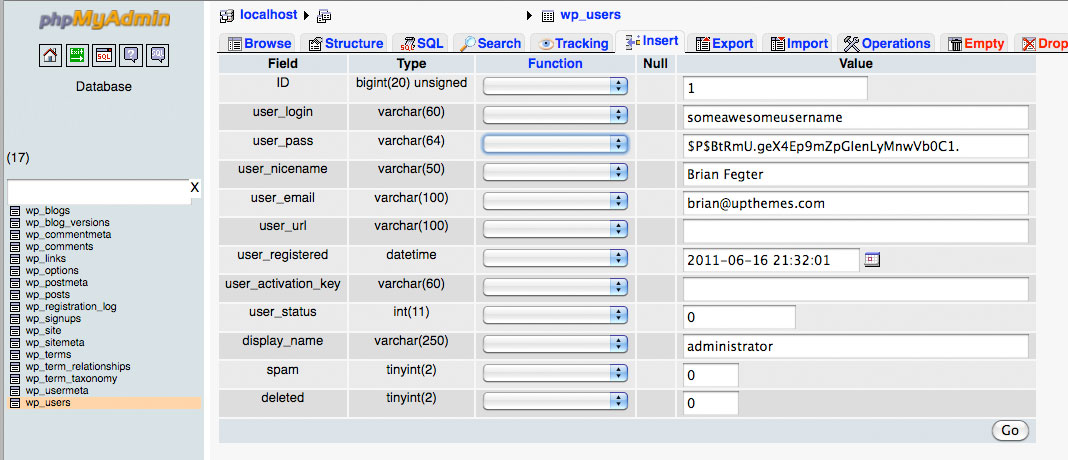
2. Select MD5 from the Function dropdown in the user_pass row
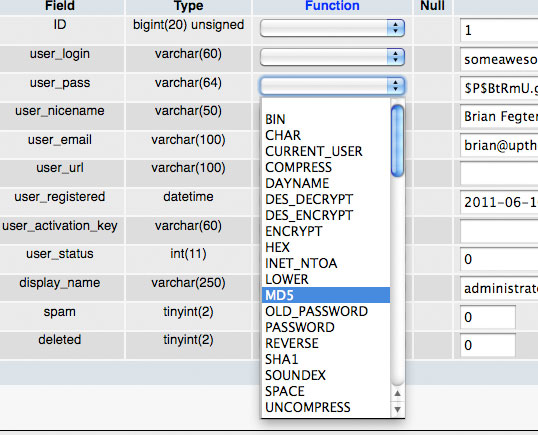
3. Input a normal text password

4. Upon saving, you should see the new password hash

 . All Rights Reserved.
Thanks for this post.But when i tring to modify the the password it updated well but can’t login.Actually i imported the sql file from live server to localhost.I dont know what was went wrong 🙁
Respected Sir,
You are my God sent Messiah, who saved me tonnes of hours that I would have otherwise spent in resetting my password and recovering my username.
Many thanks from the bottom of my heart.